Build sophisticated integrations without the complexity of traditional middleware. Kuali Bridge gives IT teams a visual way across campus systems. It speaks the native language of the Kuali Platform.
Connecting one application to another is only part of the challenge. Many institutional processes require information from multiple systems before work can continue.
A curriculum approval may require data from your SIS, employee information from HR, and financial validation before routing for approval. A research workflow may need to retrieve investigator information, validate compliance requirements, and update multiple applications when work is complete.
These aren't single API calls - They're connected processes. Kuali Bridge was designed to build them.
Build integrations using a visual, node-based interface instead of writing custom middleware.
Retrieve, transform, combine, and route information between multiple campus systems within a single integration.
Bridge understands Kuali forms, workflows, users, and data models, making integrations easier to build and maintain.
Build an integration once and reuse it across multiple applications and workflows.
Looking up student records during form submission.
Validating financial accounts before approvals.
Retrieving employee and organizational data.
Combining information from multiple systems into a single process.
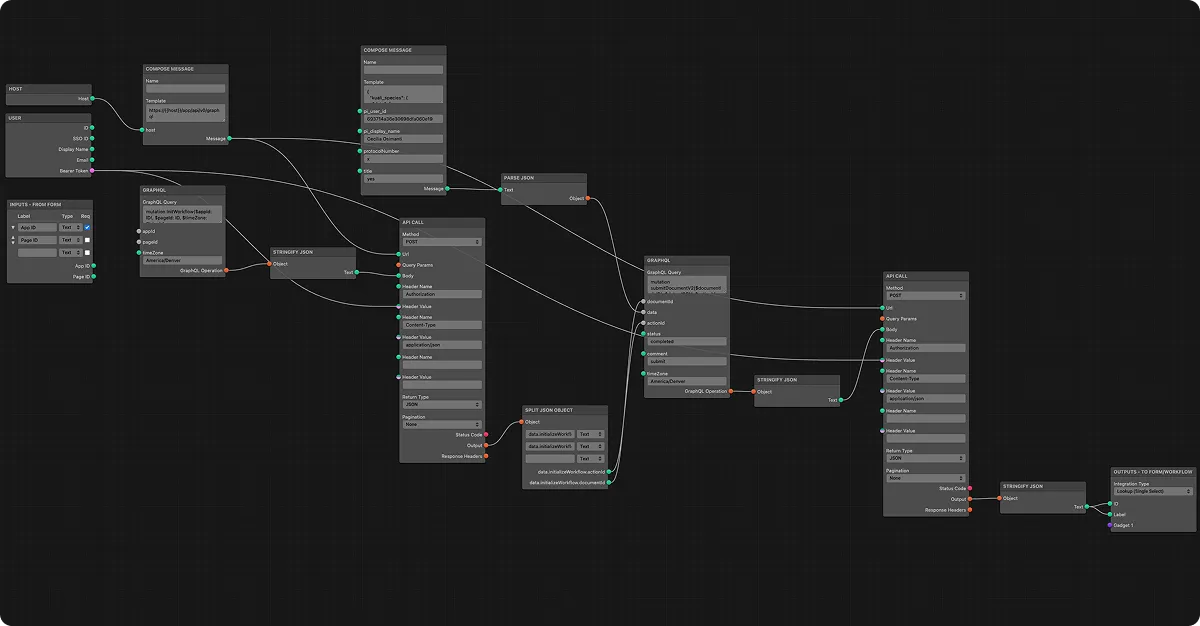
Whether you're supporting academic operations, research administration, finance, or institutional workflows, Bridge helps automate the movement of information between systems.

Looking up student records
.svg)
Validating financial accounts
.svg)
Retrieving employee data

Updating enterprise apps

Combining multi-system data

Returning data to Kuali

Visual Development
Build integrations through an intuitive, node-based interface.

Flexible Data Transformation
Modify and reshape information as it moves between systems.

Centralized Management
Manage integrations from one place instead of disconnected scripts.
Unlike generic integration tools, Kuali Bridge is designed specifically for the Kuali Platform. Your integrations work directly with Kuali forms, workflows, users, and application data, without custom adapters or complex configuration.
Leverage the same authentication, permissions, and governance capabilities that power the Kuali Platform.

Role-based access, same as every Kuali app
No separate permission system to manage
Centralized, admin-controlled access
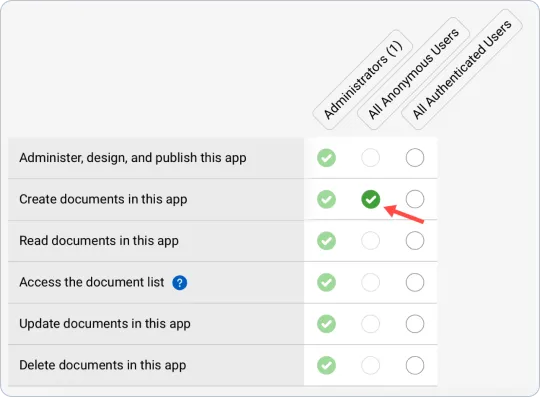
Secure by design
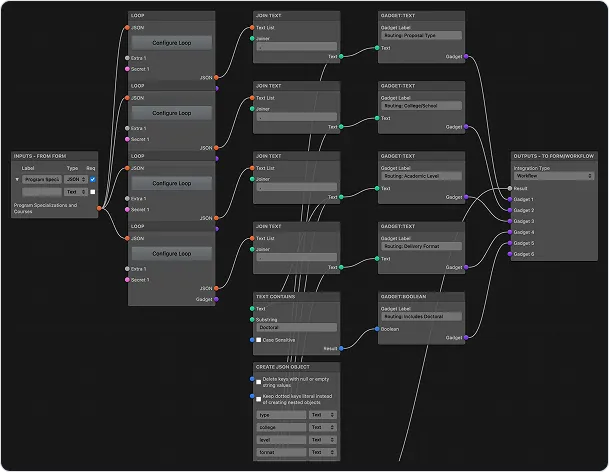
Add gadget nodes to any connection to export data in the exact format Kuali forms and workflows expect.
Structured output, ready for any form
Compatible with any Kuali workflow
No manual field mapping required

Deputy CIO, UC San Diego

Visual Integration Designer — build integrations using a visual, node-based interface instead of writing custom middleware. See exactly how data moves, step by step, before you publish.
From research universities to community colleges, hundreds of institutions rely on Kuali Bridge and Kuali integrations.
processes automated
institutions served
in higher education
total grants managed
transactions
"Where other workflow tools struggled, Kuali scaled."

Director of Data Systems, Gettysburg College

"The old solution was to use people and email and PDFs and paper to do the integration, and it just was not scaling—absolutely not scaling."

Application Architect, Tufts University

"Kuali combines a scalable platform with a responsive, collaborative team that truly understands higher education."

Assistant Provost & Chief Sponsored Research Officer, University of Baltimore

How Fresno State used API-first integrations that read and write back to its ERP to connect campus systems.
Read the case study →
What to look for in campus platforms, including integration depth, security, and ease of use.
Read the blog →
How integrated workflows connect campus systems of record and retire paper and email processes.
Read the blog →Kuali Bridge helps IT teams create the connections that power better workflows, better data, and better experiences across campus.