WHY KUALI

More Than Connected. Unified.

Catalog, and Management are built on the same platform—not separate products stitched together over time. And because that platform is extensible, you can also build and automate the unique petitions, approvals, requests, and workflows your institution needs—all in the same place. One platform for your core academic operations—and any process around them.

KUALI AI GATEWAY · AVAILABLE
Explore AI Gateway →

WHERE MOST ACADEMIC SYSTEMS STOP

Curriculum
Catalog
Scheduling
and the story ends when the course is published

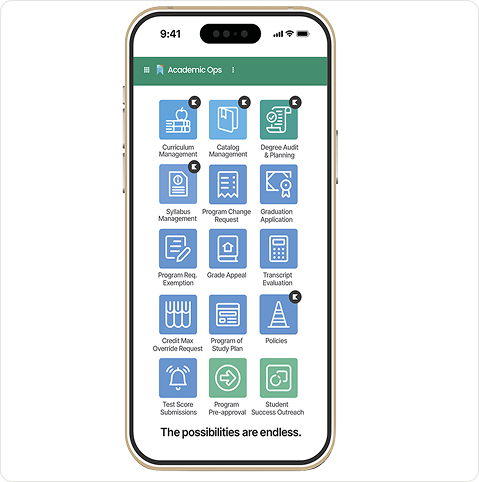
KUALI ACADEMIC OPERATIONS

Curriculum
Catalog
Syllabus
Advising
Degree Audit
And every other process your department manages

More than connected. Unified.

Curriculum, catalog, and syllabus management are built on the same platform, not separate products stitched together over time. One record, one workflow engine, one place to look.

Extensible by design.

Because the platform is extensible, you can build and automate the petitions, approvals, requests, and exceptions your institution runs on, in the same place as the catalog.

THE ARCHITECTURE, LAYER BY LAYER

See what makes an Agentic Campus possible.

An AI assistant can answer a question. An Agentic Campus has to do much more: understand institutional context, work with trusted data, respect permissions, follow workflows, interact with existing systems, take action, and leave behind an auditable record.

02
PROMPT TO BUILD
Describe the work. Kuali makes it happen.
AI-NATIVE CAPABILITIES

Today, use the AI Connector to build forms, workflows, and applications, or help you understand the work already happening.

And this is just the beginning. Soon, a prompt can become an ongoing instruction: an AI agent can run this report every Monday, watch for stalled approvals, or flag something that needs attention. This is AI with appropriate oversight. An agent prepares the work, your team approves it, and nothing reaches a student, a faculty member, or a system of record without that approval.

Ask
Build
Monitor
Act
"Turn this transfer credit PDF into an online request with department approval."
Build
KUALI GENERATED
Form created
Fields extracted
Approval workflow configured
Permissions applied
03
KUALI BRIDGE + OPEN DATA
Your systems stay. Your data and workflows connect.
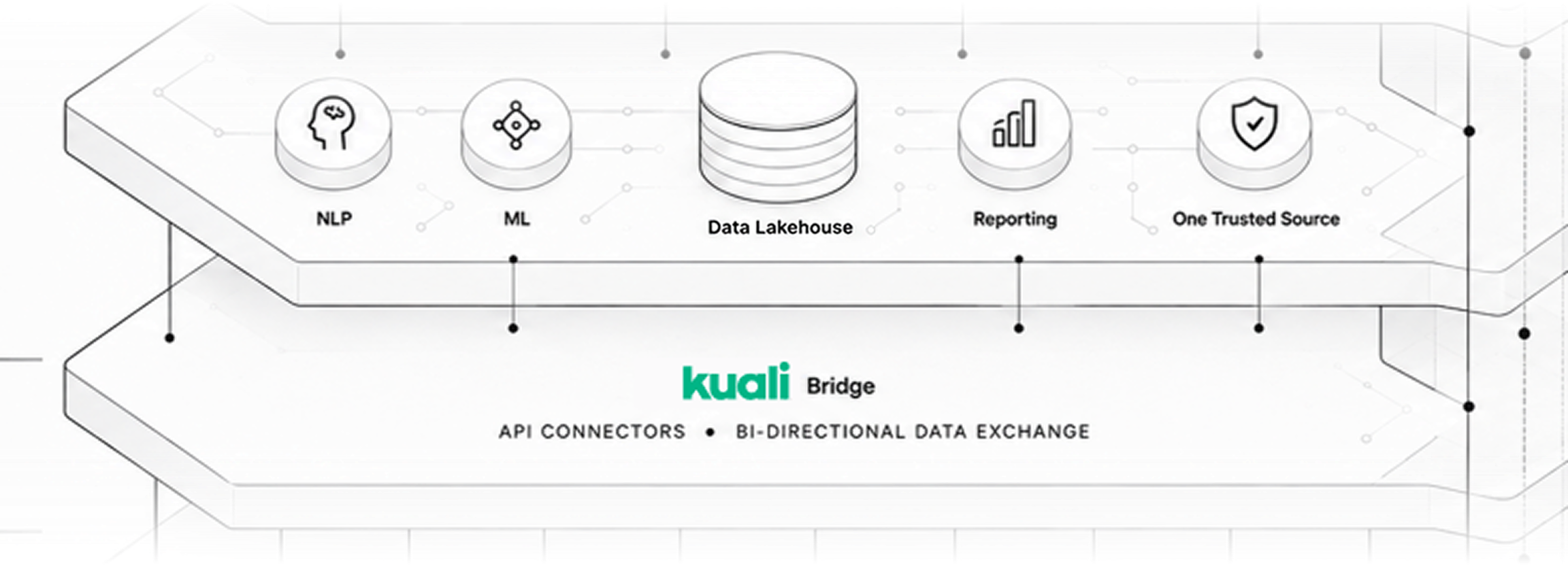
DATA LAKEHOUSE + KUALI BRIDGE

Kuali is API-first because the Agentic Campus has to work with the technology your institution already runs. Kuali Bridge connects workflows to systems such as your SIS, ERP, HR, LMS, identity providers, and data stores, so information moves into and out of Kuali without another manual handoff.

Banner
Workday
PeopleSoft
Identity providers
ERP
AI is only as trustworthy as the data beneath it. When answers and actions trace back to governed institutional data, your team can inspect the source, verify the result, and understand how Kuali got there.
See how Kuali connects to your campus systems
Explore Kuali integrations →
One trusted foundation

Platform data is available through a governed, queryable model designed for reporting, analytics, machine learning, and AI, so your analysts, applications, and eventually your agents work from the same information.

Real-time data

Changes become available in seconds rather than overnight batches.

Documented relationships

Tables, columns, and joins are discoverable rather than guessed.

Built for existing tools

Connect Tableau, Power BI, Looker, or Excel over a standard connection.

Governed by design

Access stays controlled, auditable, and scoped appropriately.

04
WHY ARCHITECTURE MATTERS
You can't bolt your way to an Agentic Campus.
THE FULL STACK

Connecting applications is useful. Giving an AI assistant access to those applications is useful. But neither creates an Agentic Campus. For AI to safely perform institutional work, it needs more than access: trusted data, institutional context, permissions, workflows, governance, integrations, and an audit trail that follows every action.

The principle is simple: people and AI operate under the same institutional rules. An agent acts with the permissions of the person it represents and sees only what that person can see. Your existing approvals stay exactly where they are, your team signs off on the decisions that matter, and everything an agent does is recorded alongside your staff's activity.

A collection of integrated tools
Separate application databases
Different permissions by product
AI sitting outside the workflow
Separate activity histories
AI answers questions
Automation across integrations
The Kuali platform
Governed platform data
Permissions carried into AI actions
AI operating within the workflow
Common, reviewable audit trail
AI performs the work you approve
Agents within institutional rules
STEP 0

Install an AI assistant

The Connector plugs into an AI assistant you already have. If you don't have one yet, install Claude Desktop — it's the path with the fewest moving parts. Already using Claude Code, Codex CLI, Gemini CLI, GitHub Copilot CLI, or VS Code with Copilot? You're set — keep going.

Download Claude Desktop
STEP 1

Get your Kuali API key

An API key is a long secret password that lets the Connector sign in to Kuali on your behalf. The key inherits your permissions — anything hidden from you in Kuali stays hidden from the Connector and your AI assistant.

1

Sign in to Kuali in your browser.

2

Click the circle with your initials in the top-right corner to open the menu.

3

Choose My Account, then API Keys, then click Create Key.

4

Copy the key somewhere safe for the next few minutes — you'll paste it once and then it's stored securely.

You'll also need your Kuali address — the part after https:// in the URL bar when you're signed in. For example: yourschool.kualihub.com.

Kuali Platform only

The Connector works with the Kuali Platform (*.kualihub.com, *.kualibuild.com, and regional variants). If you sign in at a *.kuali.co address, you're on Classic Kuali, and the Connector won't connect — see the FAQ for details.

STEP 2

Open Terminal

Every step from here happens in a small text-only window called Terminal. You'll paste one command at a time and press Return. Nothing on this page can damage your computer — but if it's your first time, take a breath.

macOS
Windows
Linux

Press ⌘ + Space, type Terminal, and press Return. A window opens with a line of text waiting for input — that's where commands go.

Use the copy button

Every code block has a copy button in its top-right corner. Click it, paste into Terminal, and press Return. Don't retype commands by hand — copy-paste avoids typos.

STEP 3

Install the Connector

In Terminal, paste the line for your operating system and press Return:

macOS / Linux
Windows

$

curl -fsSL https://connector.kuali.co/install.sh | sh

You'll see a few lines of progress, then Terminal returns to a blank prompt. Check the install worked:

$

kuali version

kuali 0.5.0

What just happened

A small program called kuali is now on your computer. It's the bridge between your AI assistant and Kuali.

STEP 4

Connect to your Kuali instance

$

curl -fsSL https://connector.kuali.co/install.sh | sh

Kuali address: yourschool.kualihub.com

API key: ••••••••••••••••

Profile "yourschool" saved · API key validated ✓

You'll be asked two questions: your Kuali address from Step 1, and the API key you copied. The text is hidden as you paste — that's expected. Now run a quick health check:

$

kuali doctor

✓ URL   ✓ Authentication   ✓ API reachable

What just happened

The Connector confirmed your key works and stored it in your computer's secure password manager (macOS Keychain or Windows Credential Manager). The key is never written to a plain file on disk.

STEP 5

Connect the Connector to your AI assistant

One more command. Pick the tab for your assistant, then fully quit and reopen it — closing the window isn't enough.

Claude Desktop
Claude Code
Codex / Gemini / Copilot / VS Code

$

kuali mcp setup

$

kuali mcp verify

Claude Desktop config written → restart Claude ✓

What just happened

Your AI assistant now knows how to call the Connector. When you ask it a Kuali question, it can fetch the answer directly from your instance.

Want the assistant to look but never change anything?

Re-run setup with read-only mode: kuali mcp setup --tools read-only. Only the list, get, search, and export tools stay registered — create, update, submit, approve, delete, and import are hidden.

STEP 6

Ask your assistant something

You're done with Terminal. Open your AI assistant and type one of these prompts into the chat window — the assistant will fetch the answer from Kuali and reply in plain English.

“List the first ten apps in our Kuali instance.”
“Which documents in the Travel Request app are awaiting my approval?”
“Summarize how many submissions each Human Ethics reviewer has completed this quarter.”

The prompt library has dozens more — including prompts for building apps from PDFs, importing CSVs with column-mapping dialogs, analyzing workflows, and generating chart reports.

AGENTS THAT ACT · COMING

Know what needs attention before a deadline slips.

Most software tells you what already happened. Kuali agents are being designed to identify what still needs attention, handle routine administrative steps, and stop where human judgment belongs.

WHAT THEY WATCH FOR
Submission bottlenecks

Surface work that is stalling while there is still time to act.

Submission bottlenecks

Surface work that is stalling while there is still time to act.

Submission bottlenecks

Surface work that is stalling while there is still time to act.

Submission bottlenecks

Surface work that is stalling while there is still time to act.

WHAT THEY WATCH FOR
Submission bottlenecks

Surface work that is stalling while there is still time to act.

Submission bottlenecks

Surface work that is stalling while there is still time to act.

Submission bottlenecks

Surface work that is stalling while there is still time to act.

Submission bottlenecks

Surface work that is stalling while there is still time to act.

THE ARCHITECTURE, LAYER BY LAYER

See what makes an Agentic Campus possible.

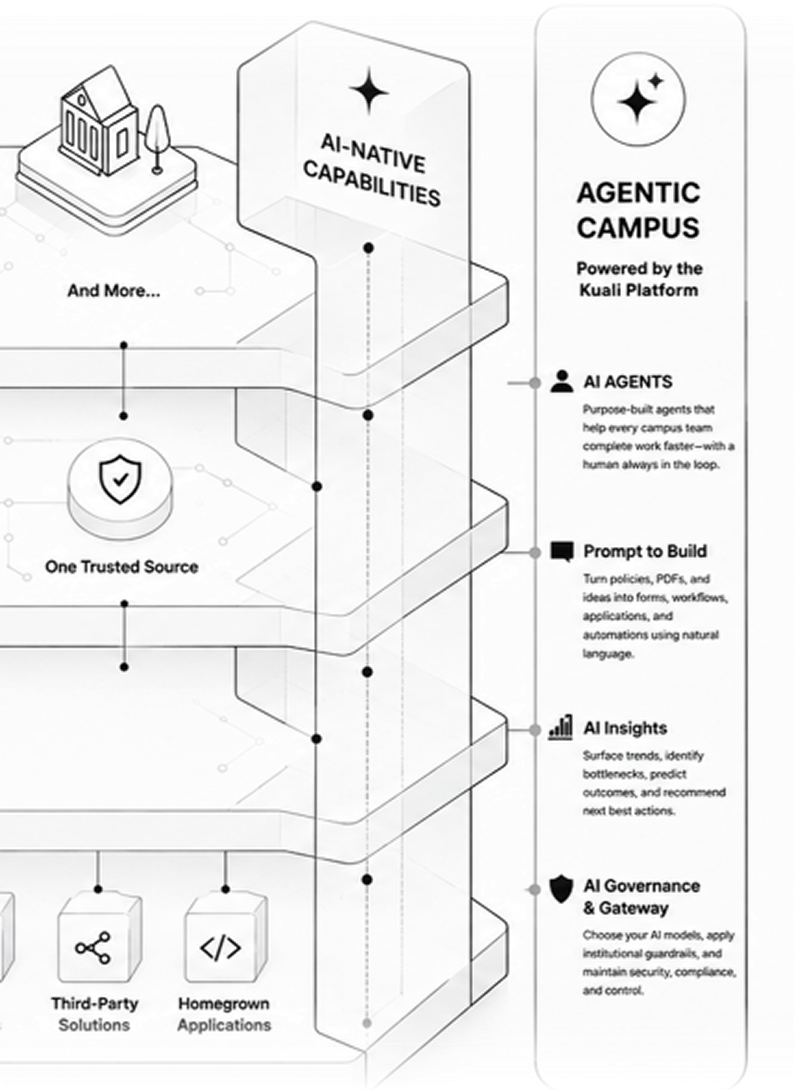
An AI assistant can answer a question. An Agentic Campus has to do much more: understand institutional context, work with trusted data, respect permissions, follow workflows, interact with existing systems, take action, and leave behind an auditable record.
01
BUILT FOR HIGHER EDUCATION
Start with the work your institution actually does.
CAMPUS SOLUTIONS LAYER

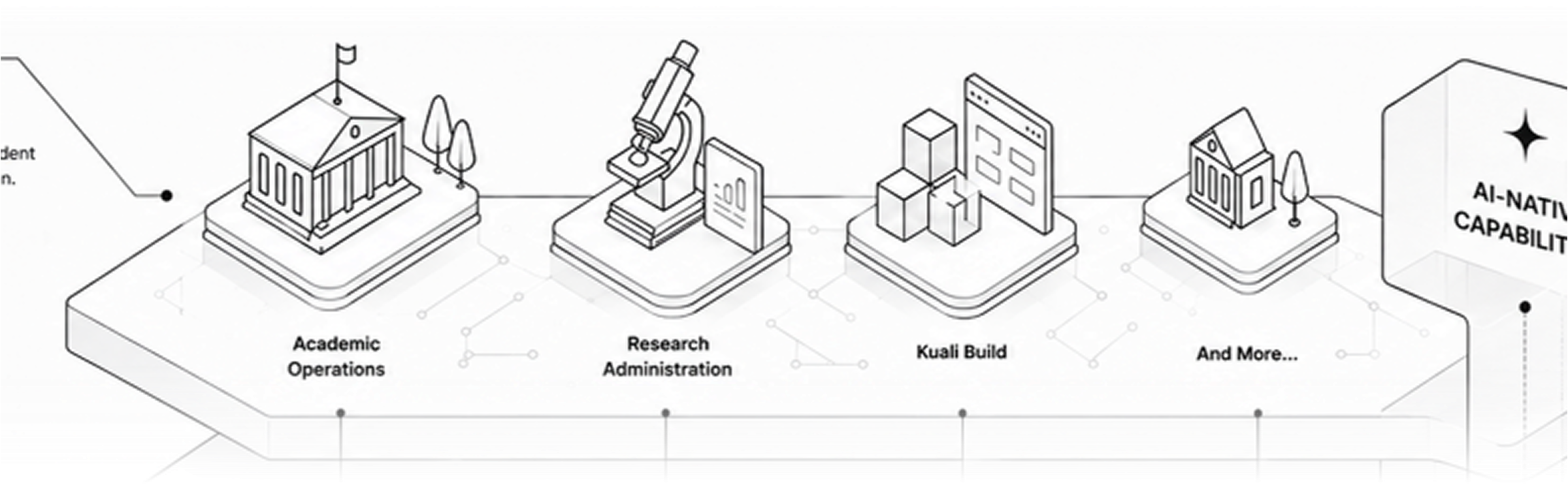
Academic operations, research administration, and university-wide workflows run on the same platform foundation. Each solution is purpose-built for its job without operating as an isolated product.

One platform underneath them means the institution isn't creating another collection of disconnected applications.

Academic Operations

Curriculum, catalog, syllabi, degree audit, planning, and the workflows surrounding them.

Academic Operations

Curriculum, catalog, syllabi, degree audit, planning, and the workflows surrounding them.

Academic Operations

Curriculum, catalog, syllabi, degree audit, planning, and the workflows surrounding them.

02
PROMPT TO BUILD
Describe the work. Kuali makes it happen.
AI-NATIVE CAPABILITIES

Today, use the Kuali AI Connector to build forms, workflows, and applications, or help you understand the work already happening.

And this is just the beginning. Soon, a prompt can become an ongoing instruction: an AI agent can run this report every Monday, watch for stalled approvals, or flag something that needs attention. This is AI with appropriate oversight. An agent prepares the work, your team approves it, and nothing reaches a student, a faculty member, or a system of record without that approval.

Ask
Build
Monitor
Act
"Turn this transfer credit PDF into an online request with department approval."
Build
KUALI GENERATED
Form created
Fields extracted
Approval workflow configured
Permissions applied
03
KUALI BRIDGE + OPEN DATA
Your systems stay. Your data and workflows connect.
DATA LAKEHOUSE + KUALI BRIDGE

Kuali is API-first because the Agentic Campus has to work with the technology your institution already runs. Kuali Bridge connects workflows to systems such as your SIS, ERP, HR, LMS, identity providers, and data stores, so information moves into and out of Kuali without another manual handoff.

AI is only as trustworthy as the data beneath it. When answers and actions trace back to governed institutional data, your team can inspect the source, verify the result, and understand how Kuali got there.
Banner
Workday
PeopleSoft
Identity providers
ERP
See how Kuali connects to your campus systems
Explore Kuali integrations →
One trusted foundation

Platform data is available through a governed, queryable model designed for reporting, analytics, machine learning, and AI, so your analysts, applications, and eventually your agents work from the same information.

Real-time data

Changes become available in seconds rather than overnight batches.

Documented relationships

Tables, columns, and joins are discoverable rather than guessed.

Built for existing tools

Connect Tableau, Power BI, Looker, or Excel over a standard connection.

Governed by design

Access stays controlled, auditable, and scoped appropriately.

04
WHY ARCHITECTURE MATTERS
You can't bolt your way to an Agentic Campus.
THE FULL STACK

Connecting applications is useful. Giving an AI assistant access to those applications is useful. But neither creates an Agentic Campus. For AI to safely perform institutional work, it needs more than access: trusted data, institutional context, permissions, workflows, governance, integrations, and an audit trail that follows every action.

The principle is simple: people and AI operate under the same institutional rules. An agent acts with the permissions of the person it represents and sees only what that person can see. Your existing approvals stay exactly where they are, your team signs off on the decisions that matter, and everything an agent does is recorded alongside your staff's activity.

A collection of integrated tools
Separate application databases
Different permissions by product
AI sitting outside the workflow
Separate activity histories
AI answers questions
Automation across integrations
The Kuali platform
Governed platform data
Permissions carried into AI actions
AI operating within the workflow
Common, reviewable audit trail
AI performs the work you approve
Agents within institutional rules
Research

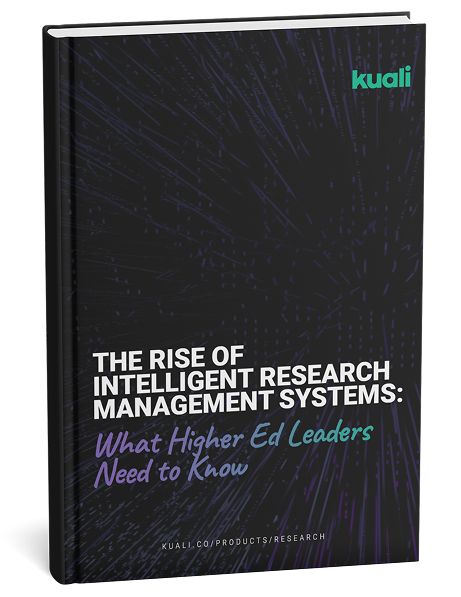
The Rise of Intelligent Research Management Systems: What Higher Ed Leaders Need to Know

Research administration is facing rising complexity, staffing transitions, and growing compliance demands. This ebook explores how AI is reshaping higher education research offices—and why intelligent, system-embedded research management platforms are essential for preserving knowledge, supporting staff, and ensuring research integrity.

Download the Ebook
EMBEDDED AI

Tell Kuali what you need. Let AI do the work.

Kuali’s embedded AI does more than tell you what’s happening. It can help you build, change, and manage curriculum processes using natural language. Ask Kuali to create or modify a workflow. Change a form or approval process. Rewrite or refine proposal content. Find proposals that are stalled. Summarize what’s happening and identify where action is needed.

“Add the Provost’s Office as an approval step for all new program proposals.”

From building the process to moving the work forward, AI is built into the way Kuali works.

CONNECTED ACADEMIC OPERATIONS

Approve it once. Keep it aligned everywhere.

Curriculum doesn’t live in isolation. Once a change is approved, that information needs to reach the academic catalog—and ultimately the course information faculty and students rely on. Kuali connects curriculum, catalog, and syllabus management on the same platform, reducing duplicate entry and helping institutions maintain consistency from approved curriculum to published academic content.

From approved curriculum to published catalog.

Approved curriculum can flow directly into Kuali Catalog, helping eliminate manual re-entry and ensuring published academic information reflects what your institution actually approved.

Explore Catalog Management
Carry that consistency into the syllabus.

Connect approved course information with Kuali Syllabus Management to help keep academic content aligned from curriculum through the classroom.

Explore Syllabus Management
CUSTOMER PROOF

One platform for more of academic operations.

Curriculum Management is part of a broader Kuali platform designed to help academic operations teams manage connected processes without adding another disconnected point solution.

“Deploying multiple platforms with Kuali has been a great experience. I highly recommend exploring everything Kuali has to offer.”

Marlise Sipes — University Registrar, CSU Global

CUSTOMER PROOF

One platform for more of academic operations.

Curriculum Management is part of a broader Kuali platform designed to help academic operations teams manage connected processes without adding another disconnected point solution.

“Deploying multiple platforms with Kuali has been a great experience. I highly recommend exploring everything Kuali has to offer.”

Marlise Sipes — University Registrar, CSU Global

CONNECTED BY DESIGN

Approved once. Accurate everywhere.

Your curriculum is the authoritative record of what your institution has approved. Your catalog is where students, faculty, and advisors need to see it. Kuali connects the two.

Explore Curriculum Management
CONNECTED BY DESIGN

Propose → Review → Approve

Manage curriculum change through institutional governance and establish the approved academic record.

ACADEMIC CATALOG:

Organize → Publish → Discover

Carry approved information forward into an accurate, searchable catalog for students, faculty, and advisors.

When curriculum changes are approved, they flow automatically into Kuali Catalog the next day—reducing duplicate entry, minimizing discrepancies, and helping ensure the information students see reflects what your institution actually approved.
STUDENT EXPERIENCE

Make the catalog more than a requirement.

The academic catalog isn't just an administrative publication. It's where prospective and current students explore programs, understand requirements, find courses, and make decisions about their academic path. Give them an experience designed to help them find answers—not hunt through a PDF.

Find what matters

Search and navigate programs, courses, policies, and academic information more easily.

Understand the path

Present requirements and related academic information in a structure students can follow.

Explore on any device

Give students a responsive experience across desktop and mobile.

Stay within your brand

Deliver a catalog that feels connected to the institution's broader web experience.

WHY KUALI

Standardization shouldn't mean one-size-fits-all.

Every institution needs consistency. Every instructor needs flexibility. Kuali separates what the institution needs to govern from what faculty should control—helping academic teams standardize policies, required content, and approval processes while preserving faculty ownership of course-specific material. Governance without rigidity.

INSTITUTION GOVERNS
• Required policies and language
• Required syllabus sections
• Review and approval process
• Institutional requirements
FACULTY CONTROLS
• Course-specific content
• Teaching approach
• Assignments and assessments
• Additional course resources
CONNECTED ACADEMIC OPERATIONS

Your syllabus doesn't exist in isolation. Neither should your syllabus software.

A syllabus is the classroom expression of decisions already made through curriculum and academic governance. Kuali connects Syllabus Management with Curriculum Management and institutional data so approved information can move forward instead of being recreated at every step.

CURRICULUM
SYLLABUS
STUDENT EXPERIENCE

When curriculum and syllabus processes are connected, institutions can reduce duplicate entry, improve consistency, and help faculty work from approved academic information.

Explore Catalog Management
WHY KUALI

Degree audit built for what happens next.

Traditional degree audit tools often provide a snapshot of what a student has already completed. Kuali connects audit, planning, transfer articulation, live course information, and completion visibility in one real-time experience.

Capability
Kuali
Traditional Audit Tools
Instant, real-time degree audit
Typically batch-based
Live major switching
Limited or manual
Integrated live course schedules
Often disconnected
Included transfer articulation
Often disconnected
Early warnings / red flags / kudos
Often separate
Institution-wide completion reporting
Limited or additional work
One connected experience. One real-time view of student progress.
STUDENT OUTCOMES

When students can see the path, they can own it.

318%

LSUA grew degree conferrals 318% with Kuali

“Students love it. They can play with different program options, and it instantly shows how their completed courses apply.”

Teresa Seymour — LSU Alexandria

more Student Ownership

“Kuali Advisor lets students play an active role in their education.”

Theresa Bosworth — Blue Mountain Community College

Students are even discovering certificates they didn't realize they were close to earning.

Less Manual Transfer Work

“Transfer evaluation used to be really manual for us. Now the audit is accurate and clear…”

Marlise Sipes — CSU Global

SEE IT IN ACTION

A closer look at Kuali Reach.

From finding support to measuring engagement, Reach connects the student experience with the work happening behind the scenes.

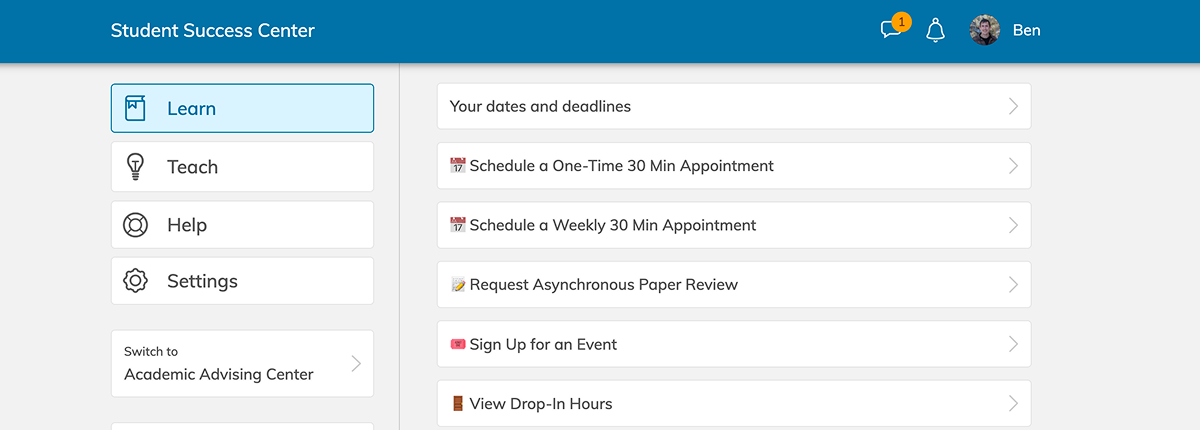
Find & Schedule Support

Students discover tutoring, advising, coaching, groups, drop-in hours, and other resources and schedule directly from web or mobile.

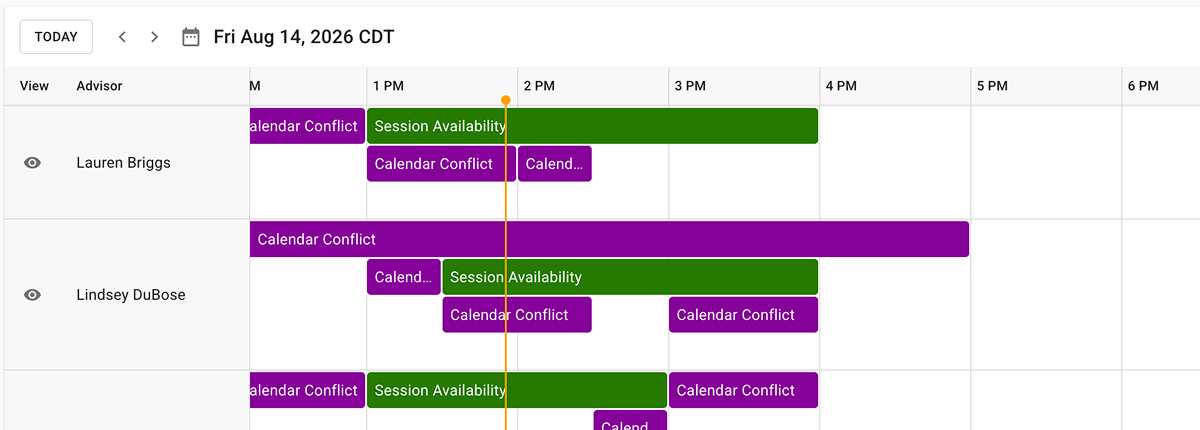
Manage Staff & Availability

Tutors and staff set availability while center leaders coordinate schedules, locations, services, and capacity.

Check In & Track Attendance

Capture appointment and event attendance through flexible check-in methods, including student self check-in and QR-supported experiences.

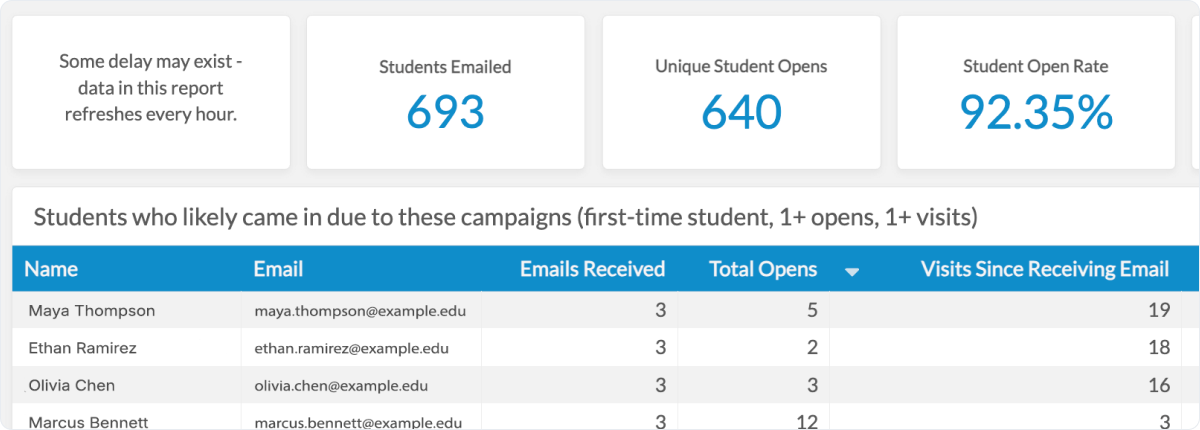
Communicate & Nudge

Capture appointment and event attendance through flexible check-in methods, including student self check-in and QR-supported experiences.

Find & Schedule Support

Students discover tutoring, advising, coaching, groups, drop-in hours, and other resources and schedule directly from web or mobile.

Where to next

Prompt library

Ready-to-use prompts for curriculum, research, build apps, imports, workflow analysis, and reporting.

Browse prompts →
Client-specific guides

Tips for Claude Desktop, Claude Code, Codex, Gemini, Copilot, and VS Code.

AI assistants →
Use it as a CLI

Skip the chat — every capability is also a plain kuali command, ready for scripts and CI.

Command reference →
01
BUILT FOR HIGHER EDUCATION
Start with the work your institution actually does.
CAMPUS SOLUTIONS LAYER

Academic operations, research administration, and university-wide workflows run on the same platform foundation. Each solution is purpose-built for its job without operating as an isolated product.

One platform underneath them means the institution isn't creating another collection of disconnected applications.

Academic Operations

Curriculum, catalog, syllabi, degree audit, planning, and the workflows surrounding them.

Research Administration

Sponsored programs, compliance, research security, and the processes supporting research.

University-Wide Workflows

Turn the forms, PDFs, emails, spreadsheets, approvals, and requests used across campus into governed digital workflows.

02
BUILT FOR HIGHER EDUCATION
Start with the work your institution actually does.
CAMPUS SOLUTIONS LAYER

Academic operations, research administration, and university-wide workflows run on the same platform foundation. Each solution is purpose-built for its job without operating as an isolated product.

One platform underneath them means the institution isn't creating another collection of disconnected applications.

Academic Operations

Curriculum, catalog, syllabi, degree audit, planning, and the workflows surrounding them.

Research Administration

Sponsored programs, compliance, research security, and the processes supporting research.

University-Wide Workflows

Turn the forms, PDFs, emails, spreadsheets, approvals, and requests used across campus into governed digital workflows.

03
BUILT FOR HIGHER EDUCATION
Start with the work your institution actually does.
CAMPUS SOLUTIONS LAYER

Academic operations, research administration, and university-wide workflows run on the same platform foundation. Each solution is purpose-built for its job without operating as an isolated product.

One platform underneath them means the institution isn't creating another collection of disconnected applications.

Academic Operations

Curriculum, catalog, syllabi, degree audit, planning, and the workflows surrounding them.

Research Administration

Sponsored programs, compliance, research security, and the processes supporting research.

University-Wide Workflows

Turn the forms, PDFs, emails, spreadsheets, approvals, and requests used across campus into governed digital workflows.

04
BUILT FOR HIGHER EDUCATION
Start with the work your institution actually does.
CAMPUS SOLUTIONS LAYER

Academic operations, research administration, and university-wide workflows run on the same platform foundation. Each solution is purpose-built for its job without operating as an isolated product.

One platform underneath them means the institution isn't creating another collection of disconnected applications.

Academic Operations

Curriculum, catalog, syllabi, degree audit, planning, and the workflows surrounding them.

Research Administration

Sponsored programs, compliance, research security, and the processes supporting research.

University-Wide Workflows

Turn the forms, PDFs, emails, spreadsheets, approvals, and requests used across campus into governed digital workflows.